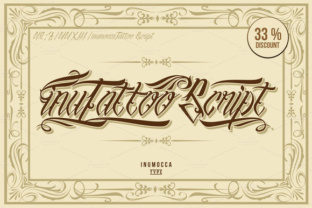
InuTattoo Script: A Display Font for Bold Digital Identity
As a web designer who builds landing pages, SaaS dashboards, and e-commerce experiences, I treat typography like interface architecture—it shapes how users see, feel, and act. InuTattoo Script stands out in my font library not as a decorative afterthought, but as a purpose-built display font that communicates authenticity, craft, and visual confidence. Its roots in tattoo lettering and swirl motifs translate into a script typeface with controlled energy: fluid curves, subtle tapering strokes, and intentional spacing that holds up at scale—not just on print, but across responsive screens.
InuTattoo Script isn’t designed for body copy or dense UI labels. It’s built for impact—hero section headlines, logo lockups, product name treatments, and conversion-focused CTAs where tone matters as much as clarity. When used intentionally, it reinforces brand voice without sacrificing digital legibility. On a boutique skincare site, it elevates “Handcrafted Botanicals” from generic to memorable. On a creative portfolio, it gives the headline “Work That Leaves a Mark” literal and emotional resonance.
Where InuTattoo Script Earns Its Place Online
This display font performs strongest in high-visibility, low-density contexts:
- Hero headers (60–90px on desktop, 42–56px on mobile) with ample line height and contrast against clean backgrounds;
- Landing page section titles, especially above benefit-driven content blocks or testimonial carousels;
- Branded CTA buttons like “Claim Your Spot” or “Get Started”—but only when paired with a neutral sans serif for supporting text;
- Online store banners for limited-edition drops, seasonal collections, or artisan collaborations;
- Digital course or workshop headers, where warmth and human touch support learning trust;
- Social media graphics exported as SVG or high-res PNGs for consistent rendering across platforms.
Avoid using InuTattoo Script for navigation menus, form fields, or paragraph text. Its personality shines brightest when given breathing room—and when contrasted with highly legible, neutral companions.
Readability & Responsiveness: Practical Notes
On mobile, InuTattoo Script remains effective down to ~36px—but only with sufficient tracking (letter-spacing of +20–40 units in CSS) and background contrast ≥ 4.5:1. I test it over both light and dark backgrounds: it reads cleanly on off-white or deep charcoal, but avoid mid-tone greys or busy image overlays unless you apply a subtle text shadow or semi-transparent overlay behind the text.
For dark mode compatibility, I export two versions of key assets—one optimized for light UIs, one with adjusted stroke contrast for dark interfaces. InuTattoo Script’s clean terminals and consistent x-height help it render crisply across Chrome, Safari, and Firefox—even when loaded as a variable WOFF2 webfont.
Smart Font Pairing for Web Design
Every strong display font needs a reliable partner. With InuTattoo Script, I default to pairing with a neutral sans serif—like Inter, Manrope, or Poppins—for all UI text, body copy, and captions. Their open forms and generous counters balance InuTattoo Script’s expressive flow without competing for attention.
For editorial or luxury-facing sites—a design blog, independent publisher, or premium service—I’ll sometimes pair it with a restrained serif (e.g., Cormorant Garamond or Literata) for subheads or pull quotes. The contrast between organic script and structured serif creates rhythm and hierarchy without visual noise.
Never pair InuTattoo Script with another script or handwritten font. Its character comes from its singular voice—not from stacking stylistic flourishes.
Licensing, Formats & Real-World Use
InuTattoo Script ships as a premium font with full webfont support—including WOFF2, WOFF, EOT, and TTF formats—so it integrates smoothly into modern build pipelines. It includes standard Latin characters, common punctuation, and basic multilingual support (Western European languages), making it viable for bilingual landing pages targeting US/CA/EU audiences.
Importantly, its commercial license covers use in client websites, SaaS dashboards, online stores (Shopify, WooCommerce), email templates, and digital ad creatives—as long as you’re not redistributing the font files themselves. For template creators or design system builders, confirm extended licensing terms before bundling it into downloadable assets.
I’ve used InuTattoo Script in live production for a yoga studio’s rebrand (hero + class title treatment), a ceramicist’s Shopify store (product name + collection banner), and a UX writing course sales page (headline + value proposition accent). In each case, it reinforced craftsmanship and intentionality—without slowing load times or confusing users.
Final Implementation Tips
Start small: apply InuTattoo Script to just one high-impact element per page—your main headline or primary CTA. Use CSS font-feature-settings if available to enable stylistic alternates for more nuanced letterforms. Always define fallbacks: font-family: "InuTattoo Script", -apple-system, BlinkMacSystemFont, "Segoe UI", sans-serif;
Test readability with real users—not just designers. Ask: “What’s the first thing you notice?” and “What feeling does this headline give you?” If answers align with your brand goals (e.g., “bold,” “handmade,” “confident”), you’ve landed the right typographic tone.
InuTattoo Script doesn’t try to be everything. It’s a focused tool—a display font that brings tactile authenticity to digital spaces. When matched with smart layout, thoughtful contrast, and clear typographic hierarchy, it becomes more than decoration. It becomes part of the user’s first impression—and often, their reason to stay.